guest@BipbopPC:~/writing$ less cpsc-39-write-up.md
Errors encountered: there were… so many
May 2021 · C# · design
A post-mortem on data structure choices and an entity manager I wrote almost entirely before ever testing it against the renderer. Everything rendered upside down, and my fix was not very good, but it worked.
Christopher Gemperle, CPSC-39, Final Project Report. May 14th, 2021. Rhythm Game and Custom Entity Manager.
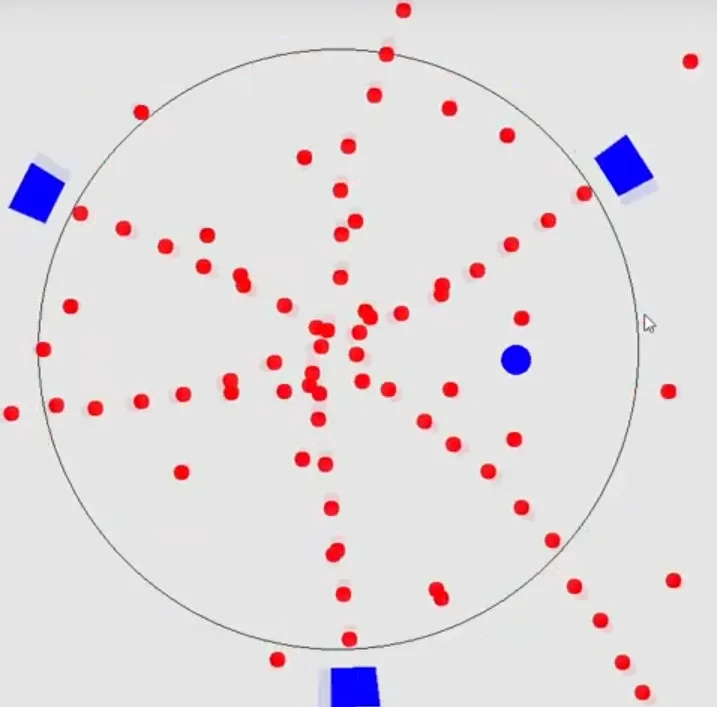
This program is a short rhythm game made using a very simple and incredibly janky “game engine” that I cobbled together in the past three days. Everything in this project had to be narrowed in scope because of how ambitious my project proposal was, but it all works. The game is a bullet hell where the player is a blue circle dodging red circles shot at them from turrets rotating around an even larger circle, and lasts about 40 seconds before the hardcoded turret spawns run out and all you’re left with is the music. The player can move with the W, A, S, and D keys.
The Entity Manager class is effectively the “game engine,” but I don’t want to call it that because of how little there is to it. Every object in the game inherits from the same abstract, and everything that inherits from Entity is able to hold a list of Systems specific to its own entity type. This is so small that I really shouldn’t be caring about memory, but having every game object that would behave the same use the same instance of an object for its logic saves a fair bit of memory. This approach resulted from me having to totally scrap my initial Entity-Component-System design after I realized I had completely messed it up and didn’t have time to fix it.
The three main entities are bullets, bullet spawners, and the player, bullets and the player inheriting from the KinematicBody class. The systems, such as player movement, bullet movement, spawner rotation, collision detection, and several others, are run every game tick. I also ended up implementing a terrible version of the command pattern by having systems add commands, the only two of which I finished being Spawn and Kill, to the queue of commands in the EntityManager class.
I also wrote a TimeNBeat class, which is a static class that is only updated by the Canvas, and can be accessed by systems to keep track of time and the current “beat” that the song is at. There is also a KeyHandler static class that is accessed by the player and updated when KeyDown and KeyUp events for W, A, S, and D are reported by Windows Forms. The programming for the actual “game” is all in the Canvas class for the Windows Form, and is very simple. After the timer, brushes, pen, SoundPlayer, GameTiming class, and EntityManager are instantiated, the Canvas_Paint loop calls for the entity manager to update, and renders to the canvas every 7 milliseconds (or however long it takes for the render and next update to finish). Rendering is simply iterating through the list of entities and using an if-else tree with pattern matching to identify and draw each respective entity on the screen.
All the visuals were rendered on screen using Windows Forms and .NET’s System.Drawing for C#, and all of the written code in the solution (except for the auto generated methods from Windows Forms) was written by me. I chose C# because I believed pattern matching would make what I was trying to do a lot easier (but it turned out that the version I used doesn’t allow pattern matching in switch statements, so that was a flop), and because it’s the language I have the most experience in, am most comfortable using, and want to gain experience with the most. .NET also has a very efficient System.Drawing class for what it is, so I believed that would be useful as well.
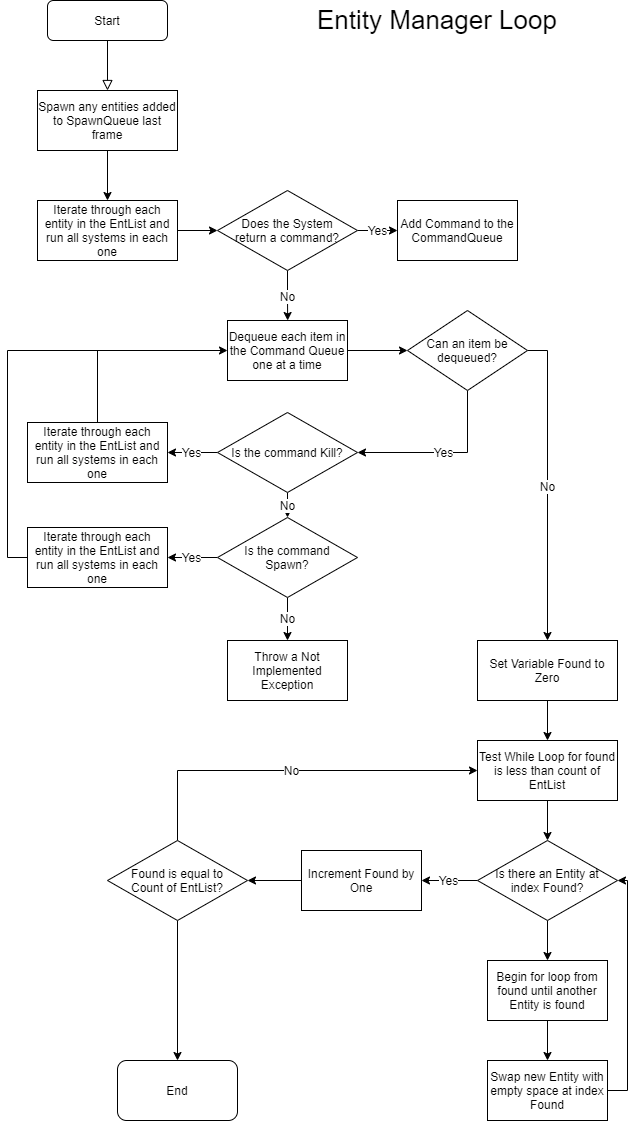
## Entity Manager Loop Algorithm
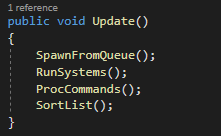
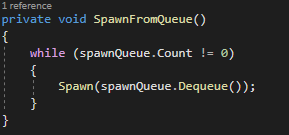
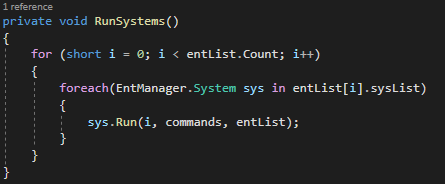
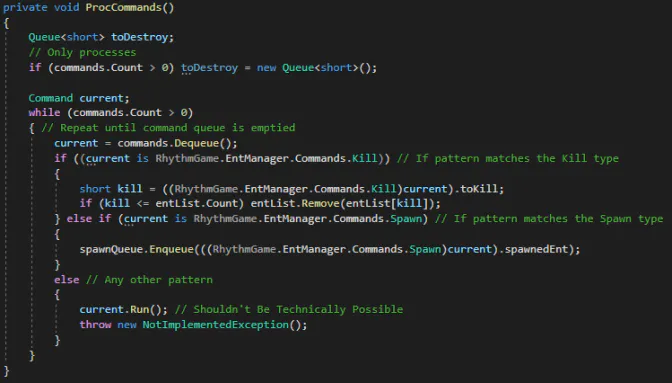
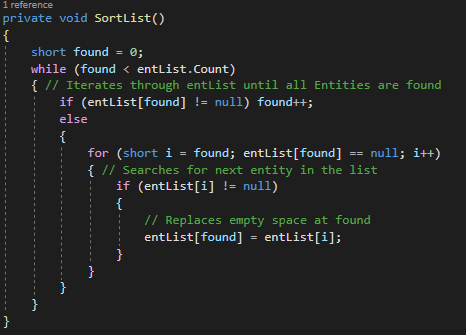
This algorithm, being the heart of the entire project, is in charge of updating and maintaining the list of entities. Its update method is called every frame, and runs all the core functions of the game. First, it will test if any entities have sent a command to spawn a bullet, and send those to the spawn command before anything else is done. It will then run the array of systems held by each Entity in the list, passing the Command queue to each system so that it can add a command if a specific event occurred. After this, all commands in the command queue are dequeued and processed, the only two working commands being kill, which removes an entity from the entList, and spawn, which adds an entity to the SpawnQueue. Finally, the sort function, which is incredibly simple because order doesn’t matter in the entList. There is only one pointer, the found variable, and it is incremented by one each time it finds an entity, and continues to do so until it has found every entity in the list. If there is a gap, it will search ahead in the list for the next entity and swap that with the empty space at the found pointer.
### Code Snapshots for Entity Manager Loop
Public facing Update function
Spawn from Queue
Run Systems Method
Process Commands Method
Sort List Method
## Render Pipeline Algorithm
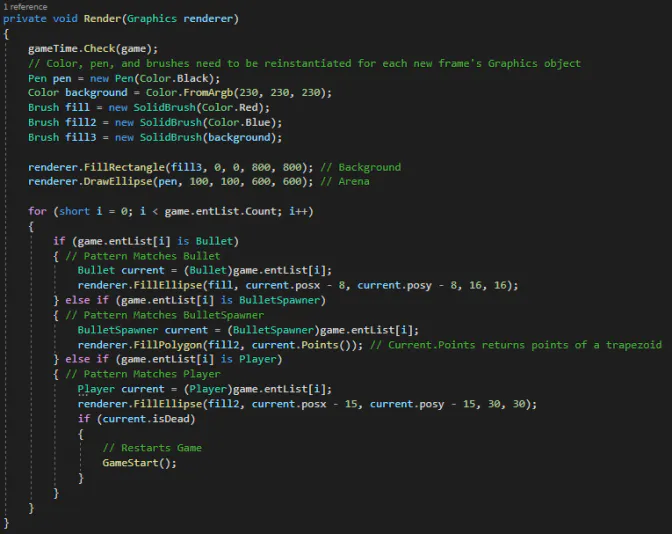
It’s a bit presumptuous to call it a “render pipeline,” but I can’t think of anything better. This algorithm creates a new pen, new colors, and new fill brushes from the Graphics object for the next frame, then fills in the background and draws the arena. A for loop then iterates through the entity list in the current Entity Manager and matches the pattern of each entity to either a bullet, bullet spawner, or the player. For bullets, a 16x16 circle is filled at the bullets position. For bullet spawners, an isosceles trapezoid is filled as a polygon by “casting a ray” out from the center of the circle toward points four degrees clockwise and counterclockwise from the center of the trapezoid, and then multiplying the unit vectors by the distance to the close face of the trapezoid for the two closer points, and multiplying by the distance to the far face for the further points. For the player, a 30x30 pixel circle is filled at the player’s position. Lastly, the algorithm checks if the player was killed, and restarts the entire game if they were (but this feature is broken and after spending a couple hours trying to fix it I just gave up).
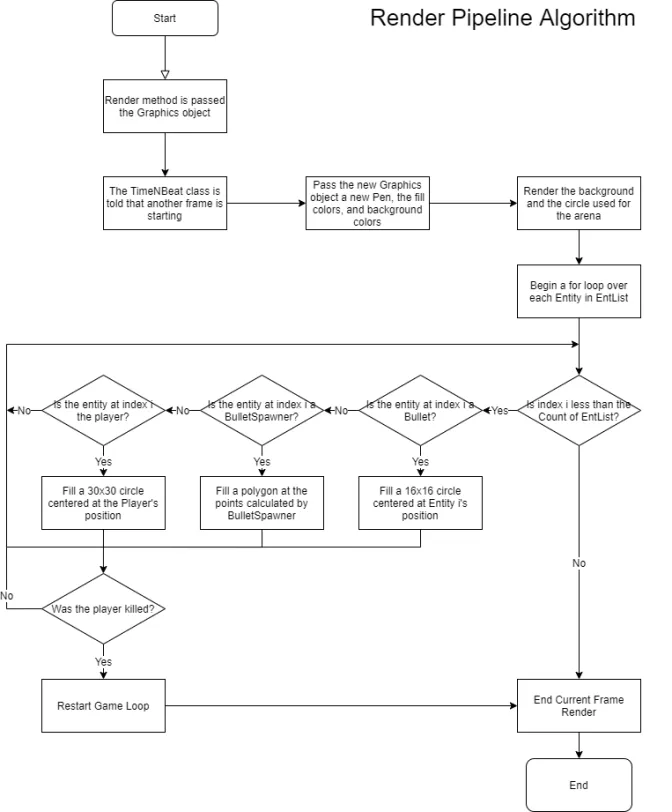
Render Method
## Discussion of Big O Times
The Big O time of my Entity Manager’s update method overall is O(n2), entirely because of the SortList class. The Big O notation of the SpawnFromQueue method is O(n) where n is the number of entities in the SpawnQueue since it has to run through the entire length of the queue while it depopulates it. The Big O notation of RunSystems is technically O(n), even though it runs a for each loop inside of a for loop, because only the length of the first for loop is dependent on the size of entList, not the for each loop, which depends on the number of systems held by each entity. The Big O notation of ProcCommands is O(n) where n is the number of commands in the command queue, because no matter what the command is, no iteration will take place for it to be executed other than the iteration involved in depopulating the commands list. Lastly, the Big O notation of SortList is, in a worst case scenario, O(n2) because the exterior while loop, as well as the interior for loop, must both iterate through the entirety of the entList.
The Big O time of the rendering pipeline is O(n), where n is the number of entities in entList. This is simply because it has to iterate through entList and find each entity only once, and because order doesn’t matter, it can iterate through it linearly and only once.
## Data Structures Used
EntList List: The entList is a list that can hold any object that inherits from the abstract class “Entity.” Every game object in the game is an entity, so this list contains all the bullets and spawners, as well as the player. This data structure was actually a dictionary until a few hours ago because losing is fun. This data structure is accessed by the Canvas to display what’s happening in the game on screen, as well as by other entities to facilitate interactions (even though I didn’t have time to finish push and pull, so the only interaction is kill). Entities are only added to the list through the spawn function, which is public facing so that the canvas, as well as commands from other entities, can spawn entities.
Commands Queue: The commands queue is a queue that gets passed to every system as it runs. The commands that are enqueued all inherit from the Command abstract, and have the ability to be run (although I never finished push or pull, the only two that would have been run). If an event occurs, such as a collision, a bullet’s timer running out, or a spawner firing, the respective command is added to the commands queue to be processed later in the entity manager loop.
SpawnQueue Queue: The SpawnQueue is a queue of Entity Definitions, or EntDef objects, that is depopulated at the beginning of every frame, spawning the entities that were enqueued in the SpawnQueue during the last frame. The reason I used a buffer for spawning new entities was that it speeds up the sorting, since there are fewer entities being added at the end of an unsorted list. This was much more important when the EntList was a dictionary, but now it serves as a slight performance boost at the cost of memory.
SysList Array: This is an array of systems used by each specific entity. Every entity of the same type has the reference to the same array of systems in order to save on memory and avoid redundant object creation, since the behavior exhibited by each entity of the same type will always follow the same rules.
AffectedIds Array: The affectedIds array is an array of shorts held by each command. Because I never finished implementing push and pull, the AffectedIds array only serves to hold the id of a killed entity when its timer either runs out, or there is a collision.
MiscInfo Array: MiscInfo is an array of shorts held by every entity definition. For some entities, like the player, it is unused, while for others, such as the BulletSpawner, it holds the starting angle, angular velocity, lifetime of the spawner in beats, the number of shots it fires per beat, and all other parameters specific to each spawner. When the new entity is created, the entity takes the information from the array and the MiscInfo array is disposed of.
Sets Array: The Sets array is part of the GameTiming class, and is just an array of booleans to indicate which waves of spawners have already been created. When I started this project I wanted to create a class to dynamically read in midi files and spawn bullets and spawners based on notes pressed… but it didn’t take me long to realize that wasn’t going to happen. Using the sets array and some hard coded spawns, I synchronized a few spawners spawning to the beat of the first 40 seconds of a Carpenter Brut song.
## Opportunities Encountered
While I was writing my AngleMath class, initially for the purpose of making the collision detection for the edge of the arena with the player easier, I realized that I could use this to make my bullet spawners look much more interesting. I designed the class with functions to calculate an angle from a vector, a unit vector from an angle, and a unit vector that could be used for linear interpolation between two points. The spawners were initially all just squares rotating around the circle, and all movement was using hardcoded trigonometry, but using the AngleMath function, I was able to make the movement code of every KinematicBody in the game much simpler and easier to read and make the BulletSpawners look much more appealing (in my opinion) by calculating the points of a trapezoid encompassing the centerpoint of the bullet spawner.
Another opportunity I stumbled upon was the Invalidate method. I thought I was going to have to do some really convoluted and complicated method of refreshing the windows form that I didn’t understand, but I ended up finding out that Forms has a method called Invalidate which calls the Paint method again, and by putting that at the end of my paint method, I got it to loop through Paint repeatedly, essentially making the game an endless loop, but any solution that works is good enough when you’re using .NET’s System.Drawing as a graphics library for a game engine. I don’t know why I thought that was a good idea.
## Errors Encountered
There were… so many. I’ll never remember all of them, but all the biggest ones are:
- * I wrote almost all of the EntManager class before ever testing it with System.Drawing. When I hooked up System.Drawing, it turned out that everything was being rendered upside down, many objects appearing off screen. My solution to this wasn’t very good, but it worked. I just flipped the signs on the Y components of most entities, as well as the output on the functions in the AngleMath class. I’m not proud of what I did.
- * Another mistake I made was building many of my selection statements as switch statements using pattern matching to find the correct object that they should act on or return. When I switched the project to a Windows Forms project, I was not able to use .NET 5.0, and had to downgrade to 4.7.2, which did not offer pattern matching in switch statements. I ended up switching some of the switch statements to trees of if-else statements, or selected in a switch statement based on the entName parameter in each entity.
- * Because Windows Forms is not meant for animation, I had to use some hacky tricks to get this to work the way I wanted. In order to get the paint method to be called repeatedly, I had to invalidate the frame every time it finished rendering, but invalidating the frame causes a new graphics object to be created. This presents another problem, where the entire screen goes white after invalidating, resulting in a terrible flickering effect. I was able to reduce the flickering by setting the thread to sleep for 7 milliseconds before invalidating, and immediately re-rendering after invalidating, but it is still noticeable. The best solution would have been to use a better graphics library like SkiaSharp or possibly even a game framework like MonoGame or XNA, but I was pressed for time.
- * For some reason I still don’t understand, when only the player is left in the arena, a command to kill the entity at index two of EntList kept getting processed. I never found out why, but I fixed it by just adding a check before commands are processed to see if the entity that is being affected by a command actually exists.
- * I’m still not completely sure why it was happening, but at first, the BulletSpawners were being rendered as hourglasses rather than trapezoids. I believe it was because it was actually being rendered counterclockwise rather than clockwise because I had switched the Y components in the AngleMath class, which was used to calculate the points of the trapezoid. I fixed the issue by swapping the values of the back right and front left points.
- * One error that I never found a solution for was the game timing and rendering completely breaking when the player is killed. The game still restarts but nothing renders for the first few seconds, and the Stopwatch does not restart correctly. The only solution is to just restart the entire program.
## Next Version of the Game
First and foremost, the first thing I would change if I were to do this again would be the renderer. System.Drawing is just not designed for this type of thing, and the flicker is terrible. Having to put the thread to sleep also seems to mess with the timing. It’s not very noticeable in the final build, but in debug builds where I intentionally flooded the screen with bullets or increased the amount of time that the thread was inactive, the music and timer went out of sync very quickly. I would also actually, properly implement the Entity-Component-System design pattern if I were to do this again. I couldn’t find the book I had read over winter break, and figured I could probably just wing it. That didn’t work out. The way I implemented commands was a total mess, and I believe it would probably have been much better to use the delegates and events in C# for entity interactions to avoid using commands entirely. I would also have liked to have added the bullet waves and color shifting background, but I ended up running out of time to add more features. It would also be really cool if I could have added a class that reads in midi input and spawns bullet spawners and bullet waves based on keys pressed, as well as a dash feature for the player to move through projectiles safely because of the added difficulty that would come from that.