guest@BipbopPC:~/writing$ less not-a-real-dog.md
Teaching a YOLOv8 model to tell a real dog from a fake one
Dec 2025 · Python · PyTorch · machine learning
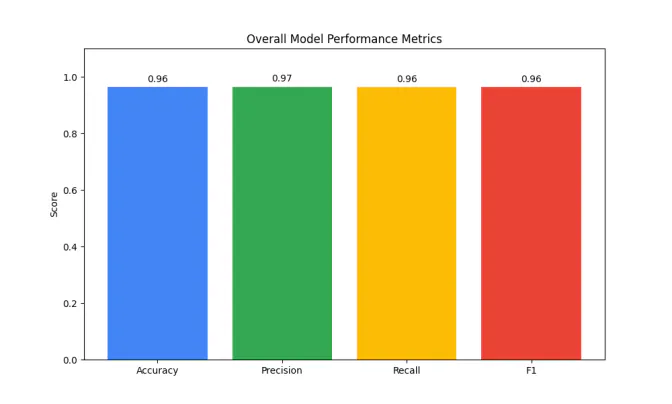
Transfer learning on YOLOv8n over a scraped three-class dataset, ROCm training on an AMD 6800 XT, and a Streamlit app that tells you whether your dog is real. Precision and recall both landed at 0.96.
That's Not a Real Dog. CSCI 581 - Final Machine Learning Model. Christopher Gemperle, 12/19/2025.
## Model Description
### Program Description
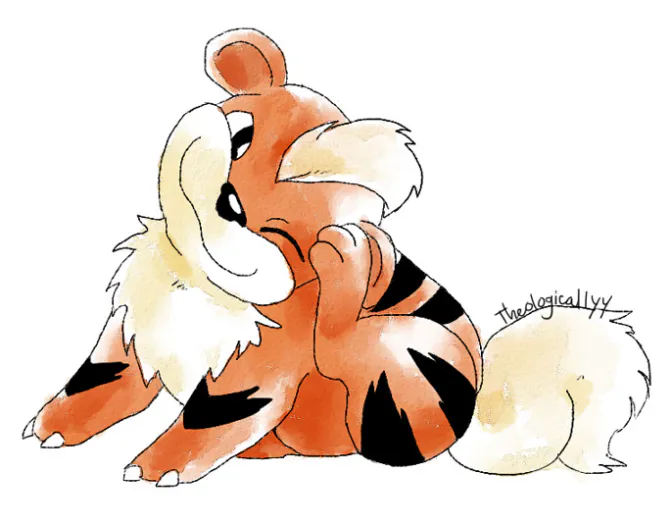
The “That’s Not a Real Dog” dog classifier is a Convolutional Neural Network built using transfer learning with the YOLOv8 Nano model, trained to be able to distinguish between real dogs, drawings of dogs, and images that are not at all of a real dog (or fake dog).
This is not a new problem that is being solved. ML experts have been plagued for years with the task of distinguishing between muffins and chihuahuas.
### Model Type and Data Used
| Model | Training Style | Description |
|---|---|---|
| YOLOv8n-CLS / CNN | Supervised Learning | Trained with Backpropagation and Stochastic Gradient Descent with PNG and JPG images. |
### Mathematical Methods and Algorithms
The model is trained using stochastic gradient descent to minimize the CSE loss function during backpropagation. I did not do any of this myself, though, because YOLO and Ultralytics take care of all of that for you… The YOLO model also black-boxed pooling layers for me. I didn’t really do any math for the project.
### Math and Algorithms Used by Model and for Training
| Mathematics | Algorithms | Description |
|---|---|---|
| Calculus | Backpropagation with Gradient Descent | Gradients are calculated using the chain rule |
| Statistics | Softmax Function | Used to create a probability distribution for the three classes |
| Informatics | Cross-Entropy | Used to measure error for the loss function |
### Value of the ML Model Solution
It’s funny. I made it because it’s funny. There is no practical, real world use case for this machine learning model. It solves no problems. It improves the life of nobody. I believe it may have the slightest merit to its existence in its capacity to squeeze a chuckle out of somebody who has a chronic case of the Mondays.
## Training and Validation
### Model Training and Validation Program
I used a python script (train.py, included in Canvas submission) to train the machine learning model using Ultralytics and the YOLOv8n-CLS model. The model was run using my brother’s AMD 6800 XT with ROCm cores. Apparently some environment variables need to be exported for this to be able to work… I don’t fully understand it, but I just did what the Arch wiki told me to do.
To run the model, create a new conda environment and install the following packages:
- * Ultralytics
- * Torch 2.5.1
- * Pillow
- * Streamlit
- * TorchVision 0.20.1
- * For AMD: PyTorch Triton ROCm (https://download.pytorch.org/whl/rocm6.1)
You may then run the model by tweaking the parameters directly in the python script (you may have less than 8 GB of VRAM), placing your three training and validation sets in dataset/train and dataset/val, then running “python train.py”. The model will be produced in the “./runs/classify/train/weights” folder.
### Training and Validation Data
Training data was gathered from four main sources. The “Real Dog” data was taken from the Stanford Dogs dataset. The “Not a Dog” data was taken from the COCO dataset but without the dog part in it (Used the COCO Api to remove all entries in category 18, “Dog”).
5000 images in the “Fake Dog” data set were scraped from E621 using e6_scraper.py and their API with the following search term:
- * rating:safe canine order:score solo -comic -anthro -feline -text -anus -sensual
The remaining images for “Fake Dog” were scraped from FurAffinity using fa_scraper.py with the following search term:
- * dog+solo+-vore+-erotic+-meme+-comic+-anus+-sensual+-anthro&audience=general
Data was split 80/10/10 - Train-Val-Test
### Training, Validation, and Test Data Description
| Data Type | Labeling | Description |
|---|---|---|
| COCO Not Dog Images | Not Dog | Used the COCO API to remove all images from category 18 (DOG) from the COCO 2014 Test and Training set, then renamed them all to random numbers and copied the first 6000 into my data set. |
| Stanford Dogs | Real Dog | Just a big dataset of dogs |
| E6 / FA Fake Dogs | Fake Dog | Digital art and scans of drawings and paintings of dogs. |
## Testing for Generalization
### Test Set Definition and Runs to Assess Model Performance
Tests were run using a separate test set. A benchmarking script, benchmark.py (generated by Google Gemini because I really hate working with MatPlotLib) generated the following graphs:
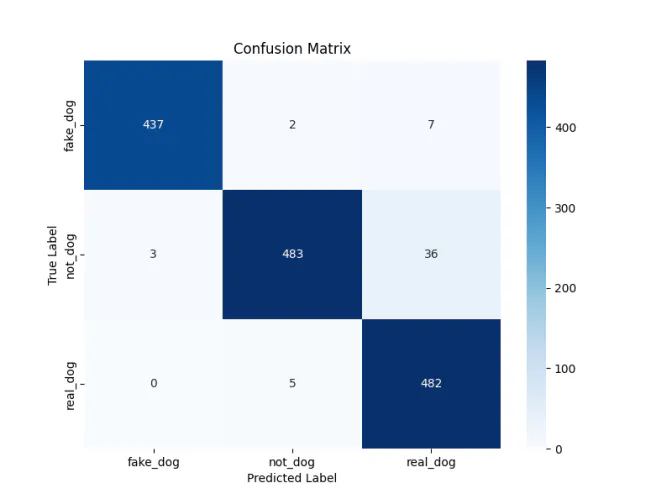
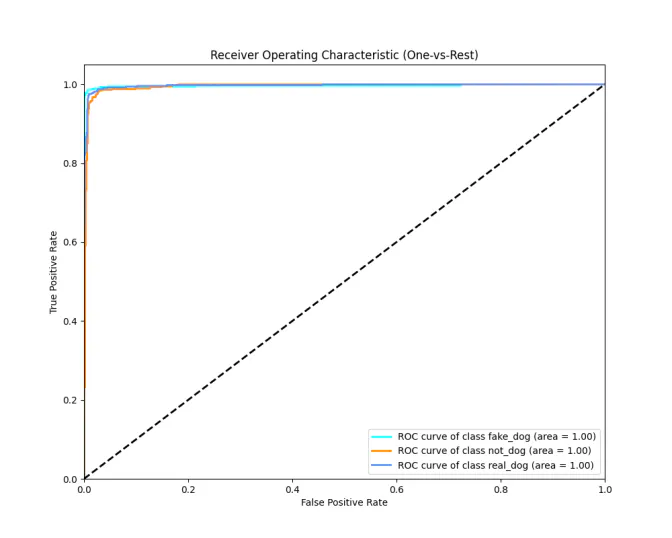
Now I don’t know what it looks like to you, but I think this is pretty got damned good. Sure, there seem to be some issues. The classifier seems to be seeing some kind of feature in the Not_Dog dataset that is causing a pretty high false positive rate for “Real_Dog” when it is shown a Not_Dog. My guess is that in many of the pictures of Real_Dogs, there are humans playing with or holding the Real_Dog, but many Not_Dog images have humans in them as well, so the classifier thinks has a chance of classifying a human as a Real_Dog. Shikata Ga Nai.
Precision and Recall are both fairly high, so I don’t believe class balancing is an issue, and because both precision and recall are both 0.96, the F1 is also 0.96… I think this means that this is sufficient benchmarking.
## Implementation
The model is implemented into an application by running it as a Streamlit app. It’s provided in my submission on Canvas, you can run it for yourself and send photos of your dog. You may learn that your dog isn’t a real dog after all.
I’m running it on my PC, but I could forward port 8501 to my PC and host it as a web app for everyone in the world that can resolve my public IP to figure out if their dog is actually a skinwalker!
## Model Implementation Summary
### Coding Completed to Build, Configure, Train, Validate, Test
I created a series of tools to complete this project. First in the pipeline, fa_scraper.py and e6_scraper.py. These were custom scripts from a past personal project that used the official E621 API and the unofficial, community-built Furaffinity API, FAAPI. They allow the user to scrape images by tags. (Safe/GA rating is forcefully injected).
A preprocessing script “preprocess.py” was written using the Pillow tool to scale and crop images down to 256x256 px. Name_Process.py was then used to convert file names to all ASCII. I then used Rename.py to assign random names with numbers from 00000000 to 99999999 to all images in my dataset to remove any bias from name ordering. Preprocess.py and Name_Process.py were also from the aforementioned personal project.
After preprocessing, train.py uses Ultralytics YOLO and AMD ROCm for hardware accelerated training. To speed up processing, I mounted 8 GB of RAM to a temporary filesystem at /mnt/tmpfs and put my dataset there, so if you want to run my train.py script… you’ll need to remove that from the model parameters.
Benchmark.py, generated by Google Gemini, again, because I hate MatPlotLib, was then used to test the models and visualize results. Deploy.py is the end of the pipeline, and opens a Streamlit app where the user can feed images to the model and see the models classification.
| Programming Language | System Used | Code Reused / New | Description |
|---|---|---|---|
| Python | Linux Workstation with AMD 6080 XT | ~40% New / ~40% from old personal project (FA_Scraper, E6_Scraper, Name_Process, Preprocess) / ~20% Google Gemini | I don’t know, man. It tells you what a dog is. |